No card for the trial. VST3 · AU · Standalone for macOS · AAX planned Windows to confirm
StarLab plays your own samples. No drum folder yet? Then it isn’t for you yet.
Live
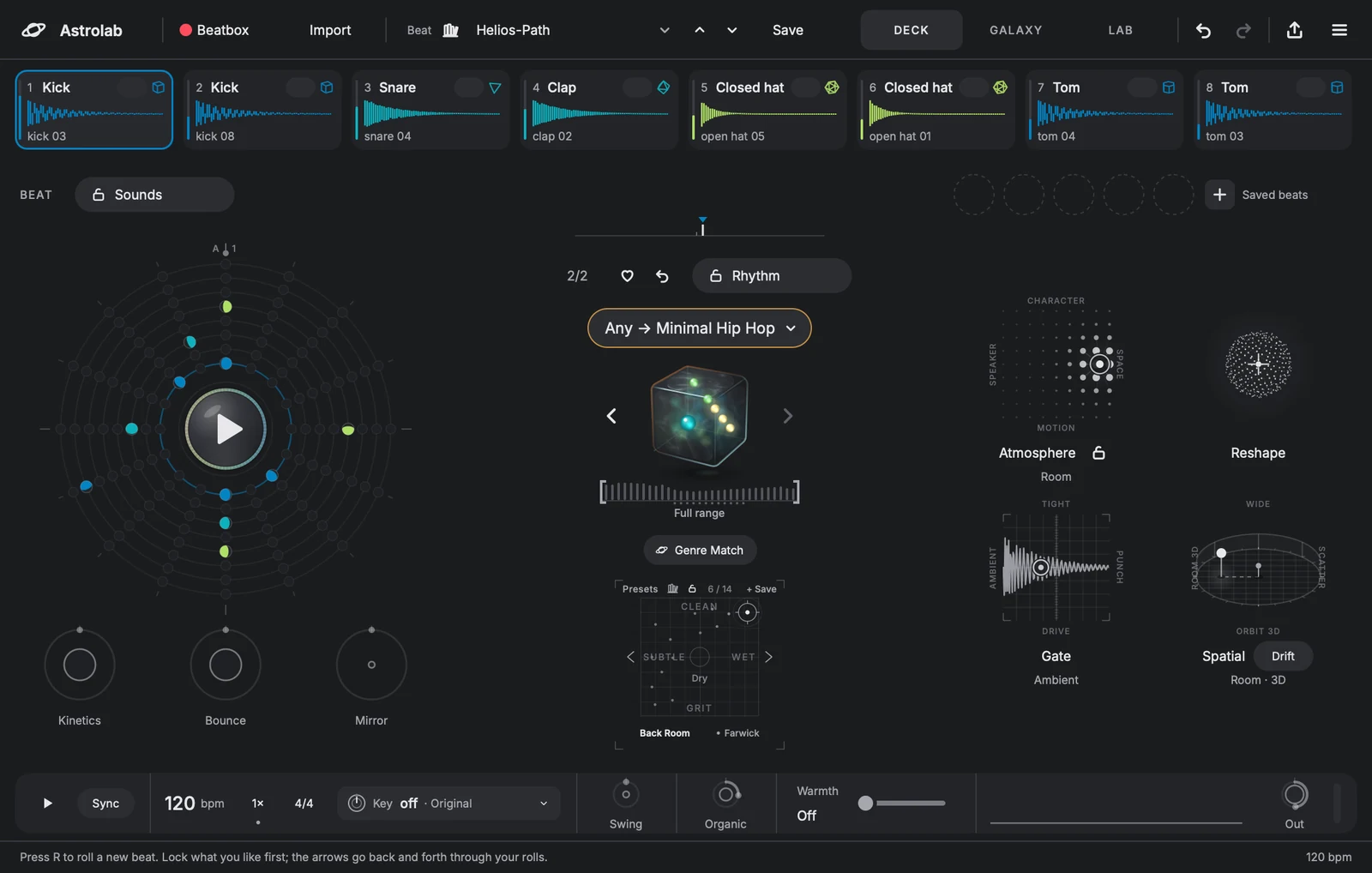
1Kit strip
Eight lanes, each holding one sound from your folders. Click a tile to hear it and shape it; lock a sound and rolls keep it.
2The beat
One ring per lane, sixteen steps round. Every lit moon is a hit, the fuller the louder; click a ring to add or remove one.
3Roll
Press the dice or R for a whole new beat, pattern and sounds together. Locked parts stay; the arrows step back through earlier rolls.
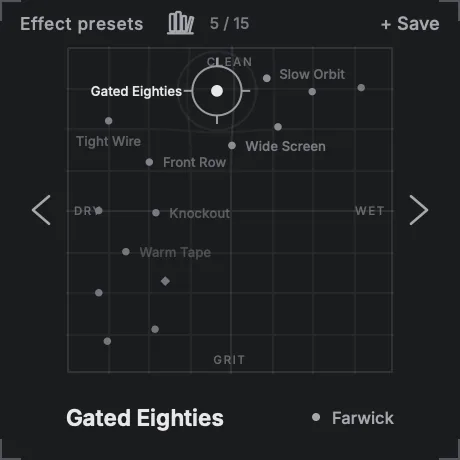
4Effect presets
Named sounds on one map, from clean to gritty. Drag the lens to a preset and the pads glide there; the centre is Dry.
5Character
Room, gate and space for the whole kit. On each pad the angle picks the character and the distance sets how much.
6Organic
No two hits sound quite the same: each varies a little in tone, attack and pitch, and softer hits sound darker, the way a player's would. 35 % is Auto; hold Alt over the knob to hear the beat dry.
Fig. 2The Deck, as it opens: a real screenshot of StarLab 0.1.3. The glass dice and the spectrum line at the bottom right run live, drawn from the plugin's own code. The marks take the colours of the skin you picked above. Swipe it sideways; tap a mark, or a row of the key, to read about it.
1Kit stripEight lanes, each holding one sound from your folders.
2The beatOne ring per lane. Every dot is a hit.
3RollA whole new beat per roll. The arrows step back.
4Effect presetsNamed sounds on one map, from clean to gritty.
5CharacterRoom, gate and space for the whole kit.
6OrganicEvery hit sounds a little different, the way a player's would.
Farwick Audio · Listen
Plate II
Fig. 3The roll, drawn as rings: one ring per lane, sixteen steps.
II · Hear a roll
Roll a beat right here.
A sketch of four of StarLab's genres, played by a tiny synth in your browser. StarLab itself plays your own samples. Nothing makes a sound until you press Play.
1/1
Genre
Organic
Hits lean like a player's.
Farwick Audio · How it works
Plate III
III · Three moves
Keep the kick you love. Roll the rest.
Fig. 4 · one of three
Point it at your samples
Add your drum folders. StarLab analyses every sample by itself, sorts it by type and character, and places each sound on the Galaxy. You never tag or rename a file.
Fig. 5 · two of three
Roll
Press the dice or R. Each roll is a whole beat, pattern and sounds together. The arrows walk back through earlier rolls.
Fig. 6 · three of three
Lock, then shape
Lock what you like and roll the rest: the rhythm, the sounds or one lane. Let your intuition lead; to go deep, open the Lab and set every hit by hand.
Farwick Audio · The Galaxy
Plate IV
Live
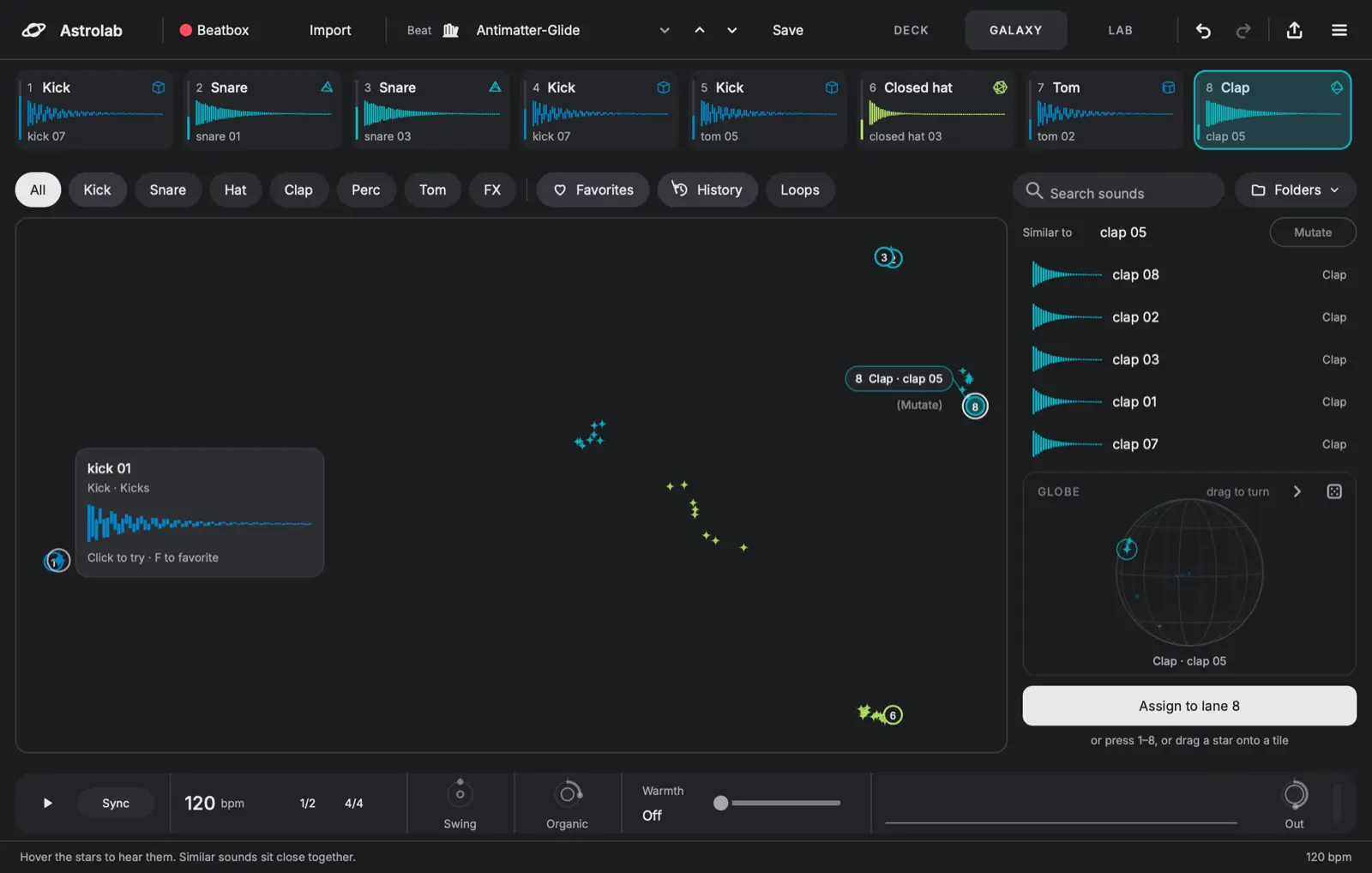
Fig. 7The Galaxy, live: your sounds drift as stars, sorted by how they sound, and a comet arcs to the sound when it changes. Drawn from the plugin's own GalaxyPage code.
IV · The Galaxy
Find the snare you forgot you owned.
Your whole library on one map, sorted by ear, not by file name. A model trained to hear drums places every sample by how it sounds: kicks near kicks, bright sounds near bright ones. Add a folder and each new sound finds its place. Pick a star to hear it, then keep it on a lane.
Fig. 8The Lab's Headphone 3D stage, playing: the kit from above with you in the middle, height on the right. Lane 1, the kick, is set to Stereo, so it stays in front. A sketch with a tiny synth and your browser's own 3D sound; the plugin uses a measured head, KU 100 by default.
V · The Lab
Hats behind you. The kick dead centre.
A wider beat without opening a mixer. StarLab mixes binaural 3D and plain stereo in one kit, sound by sound: hats can circle behind you and a shaker can float above, while the kick stays in plain stereo. Put on headphones and press Play.
We spent almost a decade designing our own DSP. To confirm
Use headphones.
Stage
Spatial pad
Stereo or Headphone 3D for the whole kit or lane by lane. Drag a lane's dot to place it, give it height, or set it moving.
The Spatial pad: Wide, Scatter (every hit lands somewhere new), Orbit 3D (sounds circle you) and Room 3D (room depth).
The sequencer on the left: patterns A and B, with steps you draw or lock.
Per lane: volume, pitch, pan, tone, length, nudge.
You get the depth, weight and glue of an analog console on every beat. One pad, nothing to set up.
Fig. 9Eight lanes, each through its own channel, then summed. The colours are the lanes of a kit.
Sum it like a desk. Every lane runs through its own modelled channel, then the whole kit meets on a console bus.
Our own summing console. Designed and modelled by Farwick: transformer saturation, and a channel stage that clips musically the harder you push the pad.
Harmonics where they help. Second first, then third, only above 90 Hz. Kick and 808 lows stay exact; hats stay clean.
Colour, not volume. Level-matched to the original within half a decibel. Press B to hear the difference.
4× oversampled · zero latency · in every edition
Farwick Audio · Mutate
Plate VII
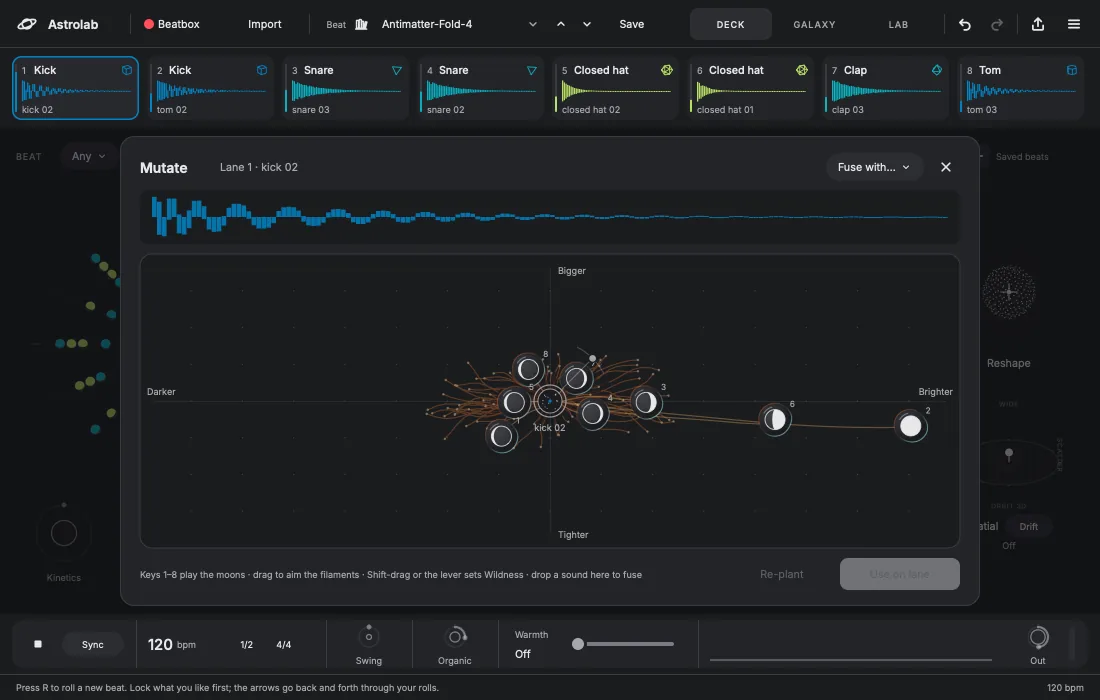
Fig. 10Mutate on lane 1: eight moons formed from one kick.
VII · Mutate
Kit almost right? Get eight snares that already fit.
No more hunting for another sample. Open Mutate on any lane and StarLab forms eight new sounds from the one you have: darker, brighter, bigger, tighter, circling it like moons. They are new sounds, made again from the original, not an effect laid over it. Play them from the keys 1 to 8 and keep the one you like.
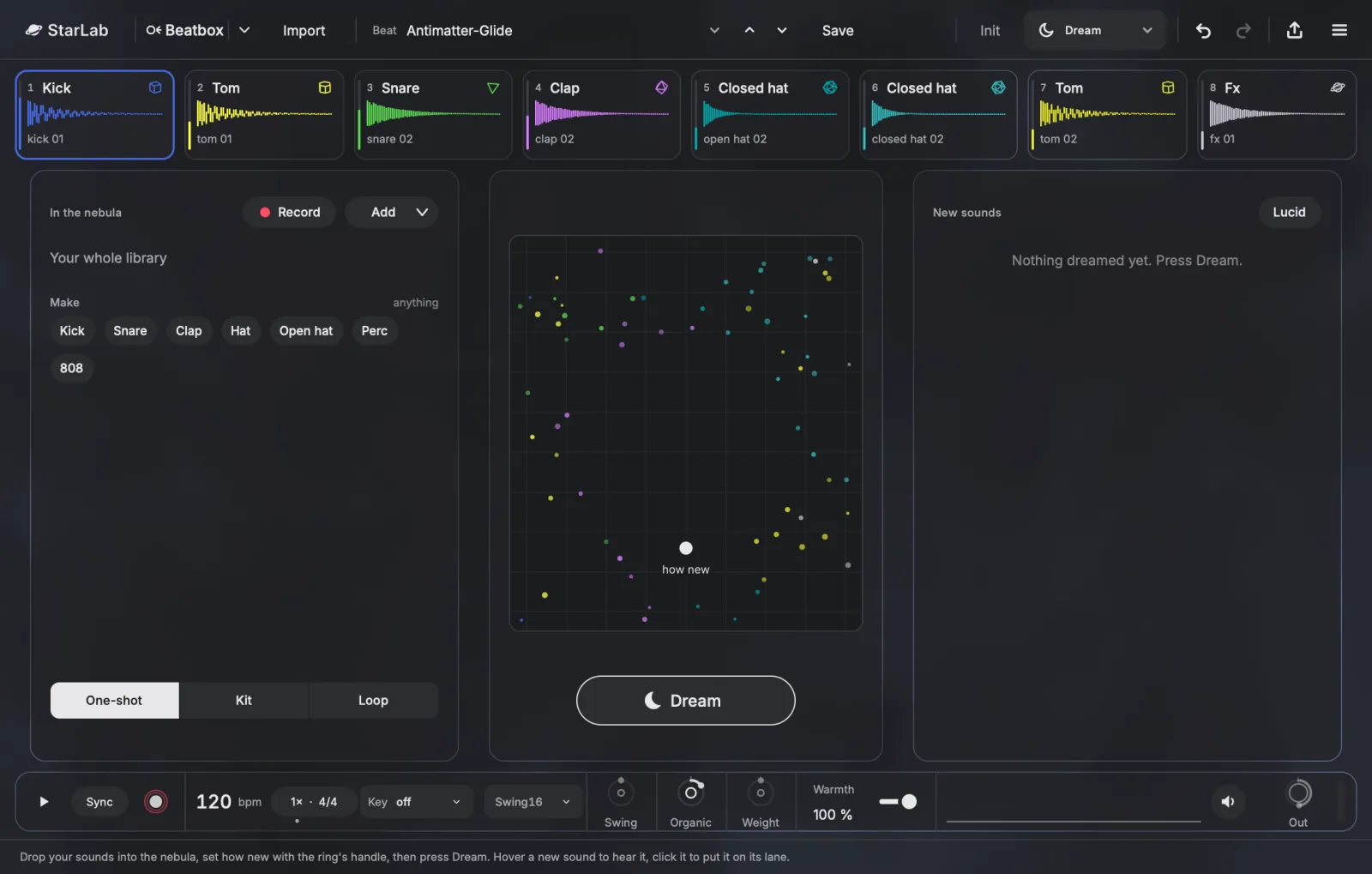
Fig. 11The Dream page in StarLab, before the first dream: your library in the nebula, the Make chips on the right.
VIII · Dream
Time to dream.
New sounds and whole kits. Grown from your own.
Drop a folder, a few favourites or a lane into the nebula. Press Dream. StarLab grows new kicks, snares and hats, or a whole kit that fits. Every sound is built from scratch by our own engine, checked against your library, and yours to keep. In every edition.
One-shot or Kit. A few new sounds, or one for every lane.
Dream from anything. Record or drop any sound, get a whole kit.
Keep. On a lane, or in your Dreamed folder.
Dream Pro, in Ultimate: steer every dream with Lucid, and dream whole loops (open in every edition until StarLab opens for sale). See Ultimate
Farwick Audio · More inside
Plate IX
IX · More inside
Also in every edition.
Small figures
Figs. 12–14
Effect presets
Fig. 12. A map of named sounds. Drag through it; save your own.
Beatbox
Fig. 13. Beatbox a rhythm and it becomes the beat, at your tempo.
Stereo or Headphone 3D, for the kit or per lane. Hear it on Plate V.
Perform: play it live.
A live mode for the stage: scenes to move between, and fills and drops on demand, from the pads.
Drop a break; it slices itself.
Drop a loop in and StarLab reads its hits. Keep the kit, the groove, or both.
Loops · drop a breakFig. 14 · live
Fig. 14Drop a loop in and StarLab slices it: the grey waveform with a lane-coloured cut line on every hit, kicks warm and low, hats cool and high. Reproduced from the plugin's LoopSheet code. In Preview the loop plays as a beat: the playhead jumps from slice to slice in the order of the sixteen dots.
Choose your look
Eight skins, as in the plugin. Colour always marks sound, from low to high, and every mark on this page follows.
Every page, pad and key, explained.
The manual starts with the install and your first beat in five steps, then walks through the Deck, the Galaxy, the Lab, the Console, Dream, Mutate, loops, Beatbox, presets, settings and every keyboard shortcut. Also as a PDF, in English and Deutsch.
A beta tester's first reaction, in their own words, used with their permission.
Name Surname · producer, city
Placeholder quote
One sentence on what changed in how they start a track. No adjectives we wrote for them.
Name Surname · engineer, city
Placeholder quote
A note from someone who made one of the effect presets, credited by name.
Name Surname · preset author
Blind listening test
0%50%100%
Result pending The share of listeners and how many took part go here once the test has run. Stated plainly, nothing rounded up.
In use by
Artist namePlaceholder
Artist namePlaceholder
Artist namePlaceholder
Artist namePlaceholder
Farwick Audio · Why I built it
Proposal · your words
From the workshop
I had over a thousand drum samples. I used the same twenty.
Draft for your own words: how many samples were on your drive, how you used to start a beat, and what changed the day StarLab first sorted the folder. Signed with your real name and city. To write
Farwick Audio · StarLab editions
Plate X
X · Editions
Which genres do you make?
Every edition is the whole instrument: Deck, Galaxy, Lab, Mutate, Dream from anything, Stems, Perform, effect presets and all eight skins. Every edition also includes StarLab for iPhone and iPad, so you can make beats on the way and send them to your Mac. The editions differ in the genres the dice can roll, and Ultimate adds three Pro features. Move up any time and pay only the difference.
Plate X · AEdition I
Fig. 15The core set: 73 genres and subgenres, lit.
StarLab
Everything you need.
The whole instrument, played with your own samples.
Dream from anythingRecord or drop any sound, get a whole kit.
StemsEvery lane out to your DAW, on its own track.
73 genresThe core genres and subgenres, Boom Bap and Lo-fi included.
$199Once. Yours for good. · tax included
Plate X · BRecommendedEdition II
Fig. 16Your five picks, joined into a constellation.
StarLab Constellation
Your five stars.
Everything in StarLab, plus the five genre packs you keep coming back to.
Pick fiveAny five of the 19 genre packs, now or later.
Swap one a monthTrade a pick every 30 days. Your beats stay as they are.
Add moreAny further genre for $15, or move up and pay the difference.
$249Once. Yours for good. · tax included
Plate X · CEdition III
Fig. 17Every star lit: all 92 genres and subgenres.
StarLab Ultimate
Every star. Lit.
All 92 genres today, and every new one the day it lands.
Genre FusionPull any two stars together.
Dream ProSteer every dream with Lucid, and dream whole loops.
Hand Tracking ProYour hands on more knobs.
$449Once. Yours for good. · tax included
X · B · Pick your five
Chart your constellation.
Pick any five of the 19 genre packs: Drill, UK Garage, Amapiano, the Boom Bap family and more. Want more? Add any genre for $15. Each pick lights one star on Fig. 16. Not sure yet? Buy now and pick later in your account; until then the dice roll the core genres.
Genres as they appear in StarLab's browser today, grouped by family. The core genres and subgenres are ticked already and never use a pick; the 19 genre packs are the ones you can pick: five are included, every further one is $15.
Identical in all three · VST3, AU, Standalone, AAX planned · 2 computers · free updates
StarLab for iPhone and iPad
Included in all three · make beats on the way · send them to your Mac by AirDrop · up to 3 devices with your license · coming to the App Store
Price, one-time, tax included
$199
$249
$449
Until StarLab opens for sale, Lucid, Dream Loops and hand learning are open in every edition. Genre Fusion is part of Ultimate already.
Fig. 18 · The upgrade path
You only ever pay the difference
Start
Free trial
14 days, every genre, no card. Find your five before you choose. Suggestion
Edition I
StarLab
The whole instrument, core genres.
$199
Edition II
Constellation
Add your five picks.
+$50 from StarLab
Edition III
Ultimate
Every star, and the three Pro features.
+$200 from Constellation +$250 from StarLab
Add picks to Constellation when you buy or later in your account, $15 each.
Swap a pick from your account, once every 30 days. Beats you already made stay in your projects.
Upgrades keep your license, computers and settings. Nothing to reinstall.
XI · Free trial
Fourteen days with every genre.
The trial is the whole instrument with every feature and every genre lit, so you can hear which five you would keep. No card. Until you buy, a soft noise plays about once a minute, live and in files you export. One trial per computer; the trial runs online, so keep the computer connected while you use it. When it ends, choose an edition and carry on where you were.
The trial download opens at launch. Nothing to download from this preview yet.
Trial · 14 days · every feature · every genre · a soft noise once a minute · no card
Activation
In your browser, from the plugin
Computers
2 per license
Online check
Every 6 hours
Updates
Free
Farwick Audio · Requirements and release notes
Plate XII
XII · What it needs
Formats and systems.
Formats
VST3 · AU · Standalone
AAX (Pro Tools)
Planned, no date yet
macOS
12 or later · Apple silicon and Intel To confirm
Windows
Later To confirm
Hosts tested
List at launch Placeholder
Sounds
StarLab Base (included) and your own folders (WAV, AIFF)
Languages
English
XII · Updates
Release notes, newest first.
1.0Launch. Release notes go here. Placeholder
0.1.30A new Beatbox: your take lands straight in a grid, with Discard, Tight and Keep; your first take teaches it your sounds. Dream in three glass boxes, like the Galaxy. Ratchet on the Deck turns the beat around the circle. Dice on Lock mode's rows, the presets and the genres; a right-click on any die learns a MIDI note. Glowing dark is the new default skin. Thermal is red now. Ghost hands: with hand tracking on, your hands show in StarLab as glass; point at Kinetics, Bounce or Ratchet to learn it (Ultimate).
0.1.29Perform moves into the Lab as side cards (Cmd+6). Shorter menus, and a right-click only opens its menu.
0.1.28Init starts truly fresh: it clears the beat and the sounds too, while tempo, key, meter and your library stay.
0.1.27Init, left of the page pill: one click clears every effect; one undo brings it all back.
0.1.26A die in every Perform row, Hand perform, and fills start off. Air Drums is a sketch pad. A Swing chip beside Key, and the moons stand where each hit plays. A beatbox take waits in a preview: Discard, Tight or Keep.
0.1.25Perform plays its fills in rows: Fill, Build-up, Drop, Breakdown, Tape stop and Repeat. Filters get presets, Lock mode keeps the filter, tuning and mix, and every lane's colour follows its sound. Clip on the Console, Dream chops from your singing, and a new black-and-white icon. Rolling never freezes.
0.1.24A clearer first start: try StarLab or activate it, side by side, and hear your first beat in your DAW at once. Keep (the heart) and Save are two steps in two places. Exports have a home: Music › Farwick StarLab, and the beat's name says whether it is saved.
0.1.23Genre Fusion, in Ultimate: × Fuse on any genre row pulls two stars together, and a blend line on the Deck leans the beat toward either one while the lighter star stays audible. On StarLab and Constellation licenses, fused beats keep playing exactly as they were made and the Fusion window opens to look; making and editing fusions now comes with Ultimate. Air Drums, in Ultimate: play kick, snare and hats in the air and keep your feel as a groove for any genre. In every edition: Dream from anything (record or drop any sound, and a whole kit forms from it) and Perform, a new page for playing a beat live with scenes, fills and drops. Send to iPhone sends a beat by AirDrop to StarLab for iPhone and iPad (included with every license; coming to the App Store).
0.1.22Weight on any sound: in a new session, Weight gives snares, claps, toms, hats and the rest more of their own body too, fuller but not louder, and while Weight is up every sound shows its own Weight bar on every page. Only the pad you reach for turns in 3D, and only when the pointer is close; at rest the pads lie flat. The closed preset pad is calmer: a ring, the two arrows and the preset's name.
0.1.21Hand tracking is realtime: StarLab moves a control the moment each camera frame arrives, and a still hand moves nothing. The Deck's three knobs can be played by hand: right-click one and pick Learn a hand movement. Your hand mappings are saved with the session. The app icon looks right again at small sizes in Finder and the Dock.
0.1.20A new app icon. A glass lens over the beat circle follows your pointer, the XY pads tilt toward it, knobs breathe while you hover them, and the preset menu is glass lifted above the Deck. Beatbox groups the sounds of a take: one tap names a sound everywhere in it, and StarLab learns your voice for the next take.
0.1.19Everything on the Deck and its panels lines up about the middle: the drawers, kit tiles, Lab rack, Console, menus and settings have even margins, and tour cards and popovers stay beside their control. Moving light costs less while you leave the window alone.
0.1.18Moving light: the Deck sits on a dark nebula that drifts with your pointer, and the die's light leans toward it (Settings: Moving light). The Deck is symmetric, three glass boxes that mirror each other. Click and hold the die to switch between the Beat die and the Motion die.
0.1.17Fixes: the standalone app now uses about a fifth of a CPU core while the beat plays, not nearly a whole one. Loops in 5/4 and 12/8 load more safely in the background.
0.1.16Time signatures 5/4 and 12/8, with five new genres: Jazz 5/4, Rock 5/4, Blues 12/8, Gospel 12/8 and Afro 12/8. StarLab Base comes with the installer: 10,483 sounds of our own (8,491 one-shots and 1,992 loops). Also new: Weight in the Lab, a heavy Drive for kicks and 808s past 150 %, My beats (a library across all your projects), and Galaxy folders you can switch on and off.
0.1.15A die on each lock and notes on the Lab's hits. Grain, a new Beat FX; drag Beat FX slots to swap them. A long sound can run under the beat. MIDI export carries the notes, and Afro 6/8 plays the long bembé bell.
0.1.147/8, with three new genres: Rock 7/8, Neo-soul 7/8 and Rachenitsa 7/8. The trained genres roll in 3/4, 6/8 and 7/8 too, and the genres in these meters come with every edition. Also new: Tighten in the timing X-ray, MIDI files you can drop in, and Beat FX on one lane or on all of them.
0.1.13Five more genres in 3/4 and 6/8: Hip-hop Waltz, Bossa Waltz, Blues 6/8, R&B 6/8 and Chacarera 6/8, all in the family Beyond 4/4. A newborn from Dream now opens straight in Mutate.
0.1.12One type system: every word set in Inter, in sentence case. The tour moves on only when you press Next, so you can try each step as often as you like.
0.1.11Time signatures 3/4 and 6/8, with six new genres: Waltz, Jazz Waltz, Folk Waltz, 6/8 Ballad, 6/8 Gospel and Afro 6/8. A calmer Deck, shorter menus, and Mutate's moons go the way you drag.
0.1.10New name: Farwick StarLab; projects, presets and licenses from Astrolab open as before. New genre packs: Phonk, Plugg, Rage, Jerk, Trap Soul, 4x4 House, Techno, Breaks, Baile Funk and Latin Trap, with their substyles. Fills for every genre, one drawer for genre, kit and limits, Moves (build, drop, breakdown, tape stop), and Make room, which ducks the kit under a vocal or bass on the sidechain.
0.1 betaFirst public beta: Deck, Galaxy, Lab, Mutate, eight skins.
Checked with pluginval at its strictest level; signed and notarized by Apple.
Library scan with the StarLab build of 25 Sep 2026 on a MacBook Pro with M2 Max: one producer’s library of 1,586 WAV files, measured by Farwick Audio on 25 Sep 2026. The 771 one-shots go onto the Galaxy; longer files are kept as loops. Your library and Mac will differ. ↩
Farwick Audio · Questions
Plate XIII
XIII · Questions
Before you buy.
Anything missing? Write to support and a person answers, usually within two working days.
If you mostly make one or two styles, start with StarLab and its 73 core genres and subgenres, Boom Bap and Lo-fi included. If you know the five styles you keep coming back to, choose Constellation and pick them. If you move between many styles, want every genre we add later, or want Genre Fusion, Dream Pro and Hand Tracking Pro, choose Ultimate.
Not sure? The free trial has every genre, so you can hear which ones you use before you decide.
Q.2Can I change my five genres?
Yes: swap one pick every 30 days from your account page, and StarLab updates at its next check. Beats you already made stay in your projects; only new rolls use your current picks.
You don't have to pick at checkout either. Buy Constellation now and choose your five in your account when you are ready; until then the dice roll the core genres. You can also add picks, or pay the difference and move up to Ultimate.
Q.3Why does it cost $199, and is it a subscription?
It is not a subscription. You pay once and keep it: your edition, two computers and free updates. The 14-day trial comes first, so you know what you get before you pay anything.
Q.4Can I upgrade later?
Any time, from your account. You pay only the difference between the editions, and your license, computers and settings stay as they are.
Q.5Do I need my own samples?
No. StarLab Base comes with the installer: 10,483 sounds of our own (8,491 one-shots and 1,992 loops), about 3 GB. You can add your own folders too, and StarLab sorts them for you.
Q.6Is there a free trial?
Yes: 14 days with every feature and every genre, and no card needed. Until you buy, a soft noise plays about once a minute, live and in files you export. One trial per computer; the trial runs online, so keep the computer connected while you use it. When it ends, choose an edition and carry on where you were.
Q.7How does activation work?
Your license arrives by email right after you pay. In StarLab, choose Activate in browser and confirm. No extra app, no dongle. You can also activate with a license file.
Q.8Which formats and systems?
VST3 and AU plugins plus a standalone app for macOS. AAX for Pro Tools is planned; there is no date yet. The full list of tested hosts goes on the requirements plate. Windows to confirm
Q.9Can I get my money back?
Yes. Within 14 days of buying, write to support and we refund the full price, no questions asked; the license then switches off on every computer. This is our own promise, on top of the law: because StarLab is a download, the legal right of withdrawal ends once the download starts, and checkout asks you to agree to that. The Widerruf page and the “Vertrag widerrufen” button are in the footer. Wording for the lawyer
Q.10How many computers?
Two per license, in every edition. To move to a new computer, release the old one in your account, then activate on the new one.
Farwick Audio · Notes from the workshop
Plate XIV
XIV · Hear first
Hear first.
One email when a new instrument is ready, and workshop notes about once a month if you want them. We confirm by email first, and every email has a one-click way out.