Farwick Audio · Catalogue No. 2
Plate I
No. 2 · Synth


808s wide in your headphones, solid on a mono club system.
An analog-modelled poly synth for 808s, basses, leads, pads and keys. Roll a new sound in one click, shape it with five pads, and play it with MPE, a plain keyboard or, in beta, your hands in front of the camera.
Every feature for 14 days on your computer. VST3 · AU · CLAP · Standalone for macOS 12 or later, Apple silicon and Intel.
Comet is in beta. Everything this page describes works in 0.0.15; the camera, voice input and MIDI out are marked Beta inside Comet: they work, and they will change.
Built for 808s, bass and dark, wide sounds. If you need sampled orchestral strings, this isn’t it.
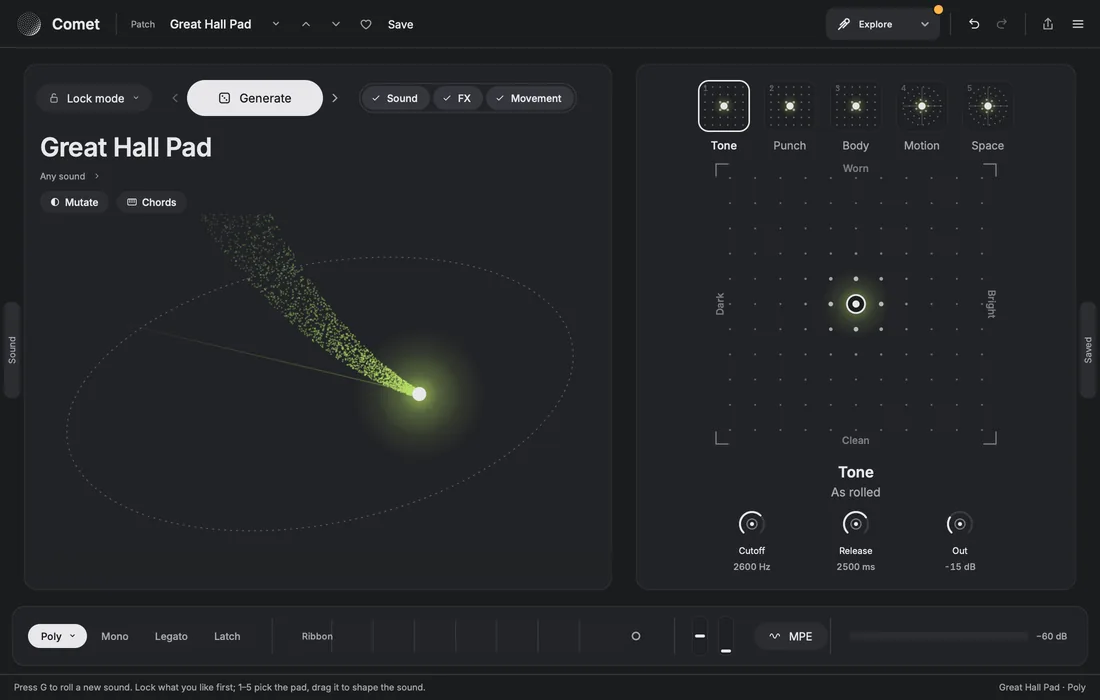
- GenerateA new sound in the category and mood under its name; every pad moves and the layers take their places on the Stage. The arrows step back through your rolls; Sound, FX and Movement say what a roll may change, and Lock mode keeps what you lock.
- The cometThe sound itself. Hold it to play; push the mod wheel and it ignites in its layers’ colours.
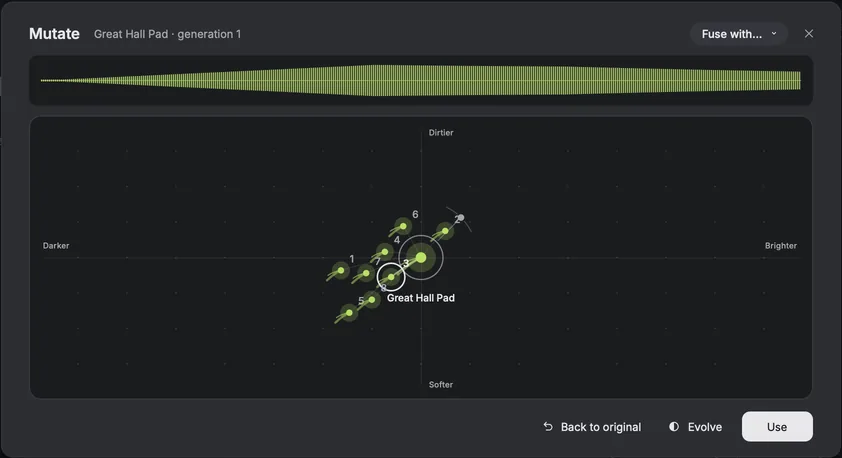
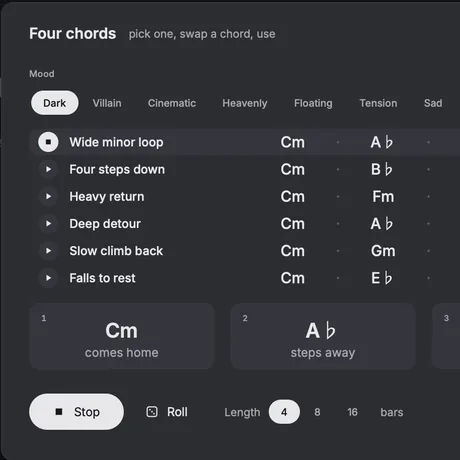
- Mutate and ChordsMutate (M) grows eight small variations of the sound (Fig. 3); Chords opens the Four chords card (Fig. 10).
- The five padsTone, Punch, Body, Motion and Space, keys 1 to 5. Drag the big pad to shape the one you picked: Tone goes darker or brighter, cleaner or more worn. Your DAW sees every pad.
- Cutoff, Release and OutLayer A’s filter, how long it rings after you let go, and the level of the whole sound.
- The control barPoly, Mono, Legato or Latch; the ribbon and the mod wheel; and the MPE chip, which opens Expression (Fig. 7).
Farwick Audio · Listen
Plate II
II · Hear it first
Factory sounds, played through Comet.
Every clip is Comet itself: a factory sound playing a short phrase, rendered offline the way your DAW bounces. Nothing was added after the render but a level match and a fade. Clips in a group switch at the same moment, so you hear the sound change, not the music.
Group 1808s and bass
One 8-bar line in C minor, four sounds. Where two notes touch, the 808s glide.
Programs 3, 9, 18 and 19, each playing the same line (120 bpm, 16 s, with its tail). Each clip set to −17 LUFS integrated (ffmpeg’s ebur128); true peaks −1.2 dBTP or lower.
Group 2Pads and keys
Four chords, a bar each, played twice: Cm7, A♭maj7, E♭maj7, B♭7.
Programs 74 (the sound Comet opens with), 76, 134 and 135. Each clip at −17 LUFS integrated; true peaks −2.0 dBTP or lower.
Group 3Leads
One 8-bar melody in C minor, played legato: listen for how each sound moves between notes.
Programs 47, 48, 50 and 61. Each clip at −17 LUFS integrated; true peaks −3.4 dBTP or lower.
Group 4Wide in your headphones, whole in mono
Dusk Carpet Bass spreads its top wide, with Width at 200 % and a chorus, and keeps everything below 120 Hz in mono. Play the stereo clip on headphones, then the same file folded to mono: what a mono club system plays. The low end stays where it was; only the top gets narrower. The third clip is everything mono drops, and there is no bass in it.
Folded to mono, the bass below 120 Hz keeps its level to 0.00 dB; above it, the sound loses 0.7 dB.1
Use headphones.
Program 25, Dusk Carpet Bass, on the line from group 1: one render. “Folded to mono” is that render summed, (L + R) / 2, on both sides; “What mono drops” is the difference, (L − R) / 2. All three at the same gain (the stereo clip at −17 LUFS integrated), not levelled again, so you hear what mono really costs. The third clip measures −31 LUFS.
How these were made
The phrases are short MIDI files written for this page, at 120 bpm. Each sound was rendered from its factory program with Comet’s own offline renderer, 48 kHz, through the VST3 from the notarized 0.0.15 installer. Levels matched with ffmpeg’s ebur128, a 1.2 s fade at the end, then AAC at 160 kbit/s. The program numbers are those of the factory library Comet has had since 0.0.8.
Farwick Audio · How it works
Plate III
III · Your first two minutes
Play it. Roll a planet. Shape it. Keep it.
- Step 1 of 4
Play
Comet opens on a factory sound, Great Hall Pad. Play your keyboard, or hold the comet on screen.
- Step 2 of 4
Roll
Every sound is a planet. Pick an 808, a pad or a lead and a mood, then press Generate or G. A new planet plays, checked before you hear it.
- Step 3 of 4
Shape
Five pads, Tone, Punch, Body, Motion and Space, change the whole sound at once. Go deeper on Lab, one layer at a time, and colour the whole mix on Console.
- Step 4 of 4
Keep
The heart puts it on your Shortlist; Save files it in your Star log. Every planet you roll is kept anyway, and each has a code you can share.
Farwick Audio · Generate and Mutate
Plate IV
IV · Generate
Roll a planet. Keep it, or roll the next.
Generate builds a new sound from scratch in the category you pick (808, bass, lead, pad, keys or texture) and in a mood. Before you hear it, Comet plays it a test phrase and checks it: not silent and not clipping, at the right loudness, in tune, with the balance its category needs and lows that hold in mono. A sound that fails is thrown away; you only hear the ones that pass. Every roll also sets the five pads and places the layers on the Stage.
- Lock what you like. Lock mode keeps a layer, the texture, the effects, the motion, the space or the stage; Generate rolls everything around it.
- Mutate (M) grows eight small variations of the sound you’re on, as moons on one pad. Aim them darker or brighter, softer or dirtier, set how wild they scatter, or fuse with another sound or a recording.
- Today’s planet, in the browser: the same new sound for everyone today, held to a stricter bar.
- Nothing lost. The arrows step back through every roll, the Star log keeps them all, and at the end › plays the next similar sound.
Farwick Audio · Width
Plate V
V · Wide, and whole in mono
Wide in your headphones. Whole on a mono system.
Below a crossover (120 Hz, unless a sound sets its own), Comet folds the sound to mono, always, and a mono guard after the effects folds back what a reverb or a chorus spreads down there. Above it, a sound can be as wide as you like. Fold Comet’s output to mono and its low end keeps its level. On the Stage, with Smart split on, every placed layer keeps its lows in the middle.
- Harmonic width: a wide crunch made from the bass’s own harmonics, so a mono bass still sounds wide.
- Width envelope: each note starts narrower and blooms wide.
- Check it: hear the output summed to mono, or through a phone’s speaker. Listening only: never in a bounce.
- Last in the chain: Glow for loudness that never clips, then a true-peak limiter at −0.3 dBTP.
Farwick Audio · Sub / 808
Plate VI
VI · The 808
An 808 that glides, dives and still reads on a phone.
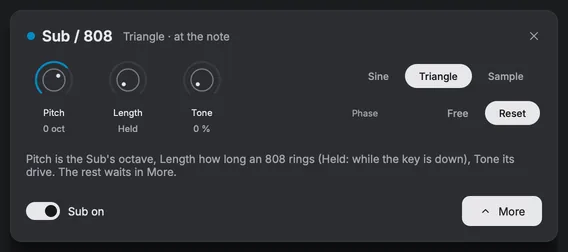
The Sub / 808 layer sits under everything: a sine, a triangle or a tuned 808 sample, and you can drop your own on its card. Translate adds harmonics that follow the note, so a low line still reads on small speakers.
- Five glide curves: Linear, Bowed, Elastic, Physical (a weight on a spring that overshoots and settles) and Smart; by time or by rate, with Snap to key.
- Drop and Dive: the pitch drop at the start of a note and the fall (or rise) at its end, per note, so it plays well with MPE.
- Under the kick: Duck dips the sound under a kick from your DAW’s sidechain, or follows the kick’s MIDI key with no routing at all.
- 16 factory 808s in the new library, each heard and rated before it shipped, and Generate rolls new ones.
Farwick Audio · The analog voice
Plate VII
VII · The analog voice
Analog-modelled, down to the drift.
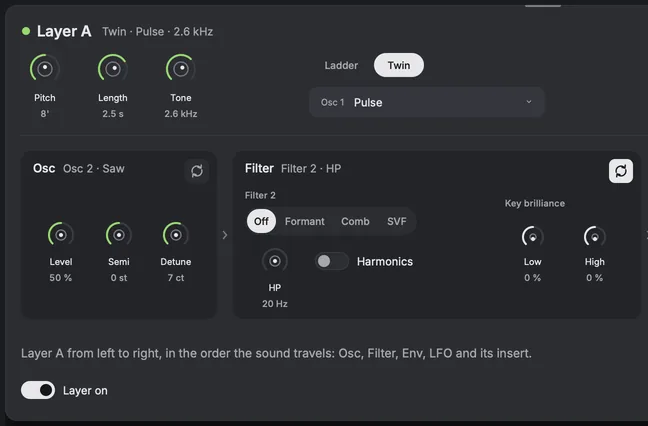
Layer A, and Layer B when you switch it on, is a whole analog voice: two oscillators and noise, two subharmonic tones, a filter and a second one (formant, comb or state-variable), drive and three envelopes. The circuit sets its character: Ladder is warm and round, Twin brighter and nasal.
- Age: from a new studio unit at 0 to a tired old synth at 100. It pulls Comet’s eight voice cards apart over time; Recalibrate retunes them to within ±0.5 cent.
- Organic: a player’s small differences in timing and velocity. Age is the circuit; Organic is the player.
- Clean where it should be: every test build checks that a saw and a pulse from C1 to C8 keep aliasing at least 80 dB down while you play, and 100 dB down in an offline bounce.4
- Bounces that match: drift, Age and Organic follow the song position, so two bounces of the same project are identical, bit for bit.
Farwick Audio · Expression
Plate VIII
VIII · Expression
Press, slide, glide. Or move your hand.
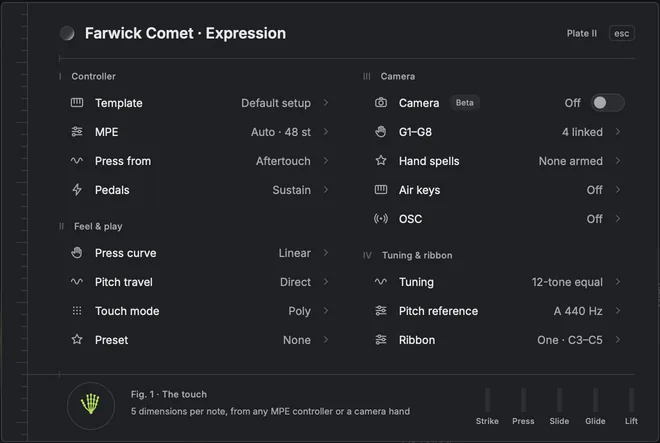
Comet turns MPE on by itself when an MPE controller plays it. Each note can move five ways (Strike, Press, Slide, Glide and Lift), and every factory sound gives Press, Slide and Lift a job. No MPE controller? A plain keyboard plays every factory sound: aftertouch becomes Press and the mod wheel becomes Slide.
- Five touch modes: Poly; Duo, with Layer A and Layer B on two zones; Cross; Drone; and Stack, where one touch plays every layer.
- The camera (beta): Comet opens a page in your web browser, served on your computer only. The video stays in that page; only numbers, like how open your hand is, reach Comet, and nothing goes to the internet.
- Per note in your DAW: CLAP per-note modulation of cutoff, resonance, drive, Layer A’s level and pan, and the Sub’s level; VST3 Note Expression.
- Your own tuning: Scala files (.scl, with a .kbm mapping) and the pitch reference.
Farwick Audio · Motion
Plate IX
IX · Motion
Record a movement once. Let it play on.
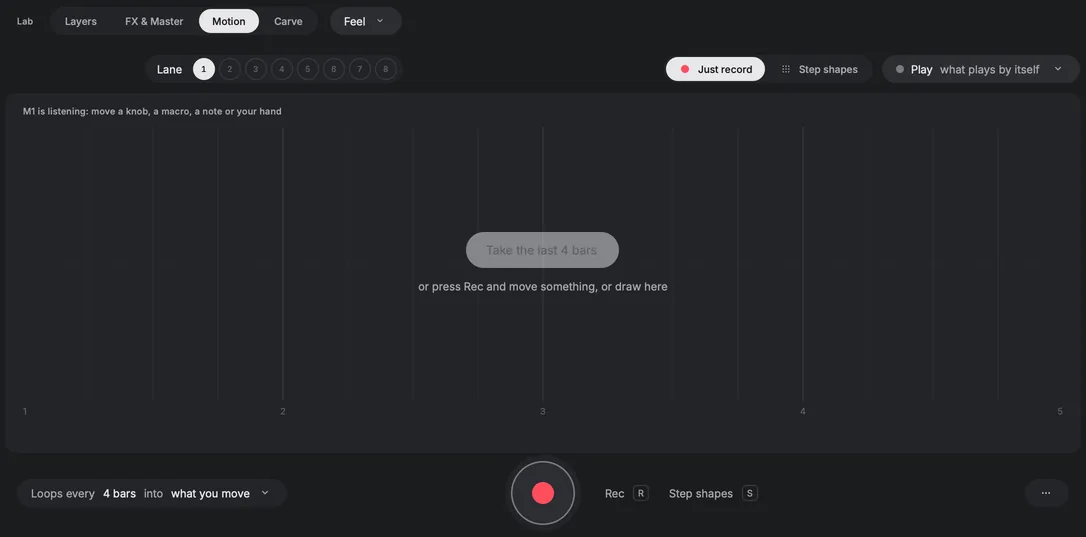
Motion listens all the time. Turn a knob, push a macro, press into a key or move your hand, then click Take: the last bars you moved go on a lane and play on, on a musical trigger: as a loop in time with the song, once per note, every few bars, or following how loud you play.
- Eight lanes, recorded, drawn, or set in 16 or 32 steps. Drag a lane into your DAW as a MIDI CC clip.
- Rules in plain sentences: when something happens, do something, for how long, at most how often.
- An arpeggiator in time with your song, with up to 32 steps you can draw.
- Phrases and scenes: twelve short phrases on the keys of one octave, and four snapshots of the sound on a pad you morph between.
Farwick Audio · More inside
Plate X
X · More inside
Also in Comet.
Small figures
Figs. 9–11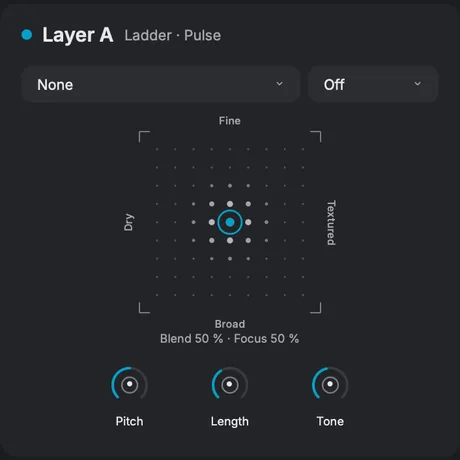
Layers, textures and Carve
Fig. 9. Layer A’s column on the Lab, on Copper Round Bass, with no texture yet. Each layer takes a texture (a factory one, your own file or what you just played; the Sub takes none), and Carve gives each layer its own part of the spectrum.
Four chords
Fig. 10. The card on Great Hall Pad, in the Dark mood: each progression is four chords that lead back home. Swap a chord for one that fits, let the loop play over 4, 8 or 16 bars, and Use puts the chords on your keys, or drag them into your DAW.
Stage
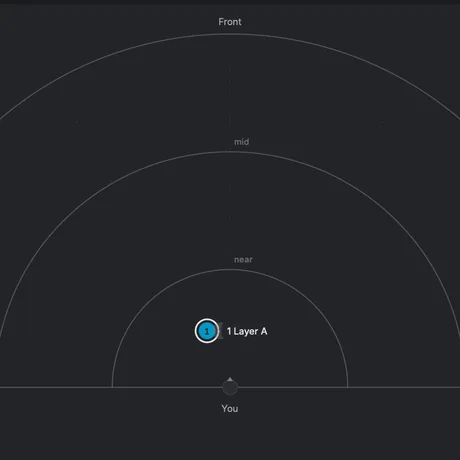
Fig. 11. The Stage page on Rubber Band Pluck, where Layer A plays alone: each layer is a dot you place near or far, left or right, in stereo or Hybrid 3D, and Movement makes it travel in time with the song. The lows stay mono.
Also inside
Ten more- 167 factory programs, new in 0.0.8: 16 808s, 29 basses, 27 leads, 58 pads (20 of them chord planets), 15 keys, 21 textures and Init. Hover one in the browser to hear it in your key.
- 199 factory textures for Layer A and B: imprint one on a layer, ring it through a body, or play it with the note. Freeze and Bake turn what you hear into a drone or a new oscillator.
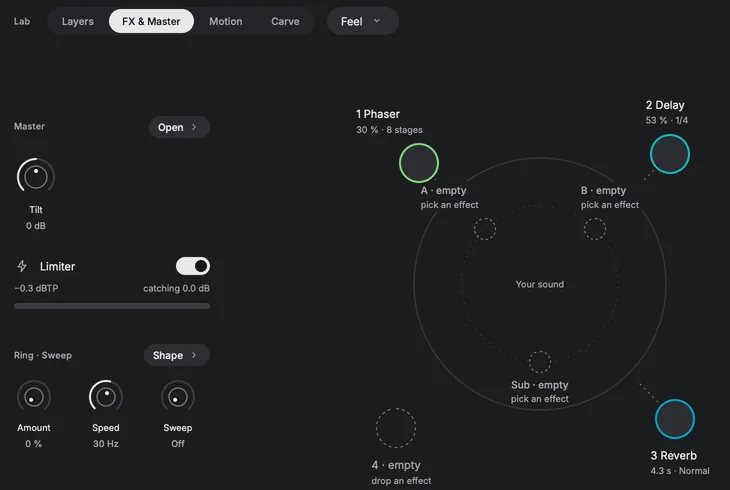
- Effects: four effect moons in six families (character, speaker, motion, space, time and dynamics), plus an insert on each layer. The reverb and the delay can follow your song’s tempo, and Ring · Sweep rings the whole sound.
- Console: colours the whole mix the way a desk and tape do, always at the loudness of the untouched sound, with a drive pad for each layer.
- Say it in words: describe a sound (“dark breathy pad, slower attack”) and Generate makes it; Your taste rolls new sounds near the ones you love.
- The bounce handle: Comet keeps the last bars you played. Drag them out as a WAV, or with Option as MIDI.
- Make room: route a vocal to Comet’s sidechain and Carve dips the synth a few dB where the vocal sings.
- Voice input (beta): hum a line and get notes, sing a note and hear a chord under it, or use Comet as a vocoder.
- Share a sound: every planet has a code like 4VZR-7WTK-TRCC; a .comet file holds a whole sound with its motions and rules.
- A help line at the bottom of the window says what the thing under the pointer does; the performance view (P) makes the window a stage.
Farwick Audio · Free trial
Plate XI
XI · Free trial
Fourteen days with everything.
Install Comet and open it: its activation card asks how you want to start. Choose Start 14-day trial and every feature runs on this computer for 14 days. Until you activate a license, a soft noise of about two seconds plays about once a minute, live and in the bounces Comet writes. You can activate a license at any time from the same window.
Before you start the trial, and after it ends, Comet is locked: it stays silent and sends no MIDI. Your projects and sounds are kept as they are.
macOS 12 or later · Apple silicon or Intel · VST3, AU, CLAP and a standalone app · the internet once, to start the trial.
Trial · 14 days · every feature · a soft noise once a minute
- 1Download and install. One installer puts the VST3, AU and CLAP plug-ins, the standalone app and the factory textures where your Mac expects them.
- 2Open Comet in your DAW or as the app. The activation card covers its window.
- 3Start 14-day trial. It asks our server once, so the internet is needed once. One trial per computer.
- 4Activate any time, in your browser or with a license file from your account.
- Activation
- In your browser, or with a license file
- Online check
- At most every 6 hours, when online
- Offline
- An activated license keeps working
- Computers per license
- Two at a time
Farwick Audio · Requirements and release notes
Plate XII
XII · What it needs
Formats and systems.
- Formats
- VST3 · AU · CLAP · Standalone
- macOS
- 12 or later Run on macOS 15.4 so far; 12 to 14 not run
- Processor
- Apple silicon and Intel, one universal installer Intel not tested
- Windows
- Not yet
- Hosts tested
- List at launch Placeholder
- Polyphony
- 16 voices · 8 voice cards
- Latency
- 90 samples at 48 kHz (under 2 ms), reported to your DAW3
- CPU, 16 notes held
- 2.1 to 6.8 % of the busiest core, six factory sounds measured2
- Offline bounce
- Render quality, 4× oversampled
- MPE
- Automatic · pitch bend range 48
- Factory content
- 167 programs · 199 textures
- Language
- English
XII · Updates
Release notes, newest first.
- 0.0.15 beta
24 October 2026. Lighter on your computer.
- A chord’s voices share the work with a second processor core, and Layer B plays on its own core beside Layer A: on the busiest core, a 16-note chord of a plain voice takes about 25 to 48 % less, a layered chord 43 to 47 % less. Sounds whose voices share something (a texture, the Stage’s unison or 3D, motion lanes, and a few more) stay on one core.
- A Comet track that isn’t playing costs about a third of what it did.
- Every sound as before: factory sounds, projects and bounces play exactly as in 0.0.14, checked sample for sample at 44.1, 48 and 96 kHz.
- 0.0.14 beta
21 October 2026. Ring and sweep.
- Ring · Sweep: a ring modulator for the whole sound, from a slow tremolo to a bell-like clang, with a sweep that pings and settles.
- The filter envelope’s Start · Peak shape, key brilliance Low and High, and the Touch brilliance expression preset.
- Smart split keeps a sound’s loudness at every pan and Stage mode; right-click replaces the ··· buttons; learn a MIDI CC by moving it; Remove with Undo.
- 0.0.13 beta
20 October 2026. Chords that grow: the chord card plays your four chords over 4, 8 or 16 bars, the voicing opening and the bass walking as it goes.
- 0.0.12 beta
19 October 2026. Space in time: the reverb’s Sync and the delay’s Fit follow your song’s tempo, and rolls can come out tempo-locked; steadier hands on camera.
- 0.0.11 beta
19 October 2026. Generate first: a new Explore with five pads and Cutoff, Release and Out; every roll shapes the pads and places the layers; the Sound and Saved drawers, Lock mode, and the Stage and Console pages.
- 0.0.10 beta
15 October 2026. Chords that sound good: real progressions for each mood that start at home and lead back, a chord’s alternatives in place, four more chords on G3 to C4.
- 0.0.9 beta
15 October 2026. A calmer Comet: Mutate on one pad, Fuse with a sound or a recording, one pill for every place, one list of what rolls keep, short menus.
- 0.0.8 beta
14 October 2026. A new factory library of 166 sounds, twenty chord planets among them; Note Locks; clearer parameter names in your DAW.
- 0.0.7 beta
11 October 2026. Easier to read: one type for every Farwick product, words instead of capitals; a saved sound keeps its name.
- 0.0.6 beta
9 October 2026. Lab and Console, Match a sound, Similar and Your taste, sounds described in words; new sounds play through a console.
- 0.0.5 beta
5 October 2026. Your license: activate Comet in your browser or with a license file, or try it for 14 days; the new Comet logo; two fixes.
- 0.0.4 beta
4 October 2026. Getting started: a welcome and a short tour, Report a problem, sounds as .comet files, a check for updates once a day.
- 0.0.2 beta
2 October 2026. 31 new sounds, an effect on each layer, Glide’s settings, how notes take voices; camera, voice input and MIDI out marked Beta.
0.0.15 passed pluginval at its strictest level (VST3) and clap-validator (CLAP). Its installer is signed with our Apple Developer ID and notarized by Apple.
Notes on the numbers
- Measured on the render behind Listen, group 4 (program 25, Dusk Carpet Bass, through the 0.0.15 beta’s VST3, 48 kHz): the level below 120 Hz with an 8th-order filter, mono sum against each channel, −0.00 dB; above 120 Hz, −0.68 dB. The side channel below 120 Hz sits 43 dB under the middle. Measured by Farwick Audio on 27 Oct 2026. ↩
- The busiest core’s time per block, as your DAW’s CPU meter shows it: 16 notes held (a mono sound plays one), Play quality, 48 kHz, 128-sample blocks, with the one voice worker Comet starts on a Mac with 4 cores or more, on an Apple M2 Max shared with other work, the least of 2 to 4 runs. Swing Low 808 2.1 %, Init 2.6 %, Glow Wire Chords 5.1 %, Tidewater 6.6 %, Great Hall Pad 6.8 %, Attic Strings 6.8 %. Measured by Farwick Audio during the work on 0.0.15 (23–24 Oct 2026), before its last two steps (Layer B on its own core, rest while silent). A table for the whole library is still to come. Your Mac will differ. ↩
- As reported to the host by the 0.0.15 beta’s VST3 (86 samples at 44.1 kHz, 90 at 48 kHz, 139 at 96 kHz). Carve’s Linear phase mode adds about 21 ms; its Zero latency mode adds nothing. ↩
- Non-harmonic energy of a saw and a pulse at every note from C1 to C8; Comet’s own test program fails a build above −80 dB in Play quality or −100 dB in Render quality. Measured on 24 Sep 2026: −102.6 dB and −124.5 dB at the worst note. ↩
Farwick Audio · Questions
Plate XIII
XIII · Questions
Before you try it.
Anything missing? Write to us and a person answers.
Q.1Is Comet finished?
Not yet: it is a beta, version 0.0.15. Everything this page describes works in it. Three parts are marked Beta inside Comet (the camera, voice input and MIDI out): they work, and they will change. If something looks wrong, ≡ › Report a problem writes a short report for us.
Q.2How does the free trial work?
Install Comet, open it and choose Start 14-day trial on its activation card. That asks our server once, so you need the internet once. Then every feature runs on this computer for 14 days, with a soft noise of about two seconds about once a minute, live and in what Comet bounces. One trial per computer.
Q.3What happens before the trial, and after it?
Comet is locked: it stays silent and sends no MIDI, and the activation card covers its window. Your projects and sounds are kept as they are; activate a license and they play again.
Q.4Can I buy it?
Not yet. The trial is the way to play Comet today. We will say on this page when you can buy it, and what it costs.
Q.5Do I need an MPE controller?
No. Every factory sound plays from a plain keyboard: aftertouch becomes Press, the mod wheel becomes Slide, and polyphonic aftertouch presses single notes. With an MPE controller Comet switches MPE on by itself; set your DAW’s pitch bend range to 48 if it asks.
Q.6Does the camera send my video anywhere?
No. Start camera opens a page in your web browser that Comet serves on your computer only. The video stays in that page; only numbers, such as how open your hand is or how high, reach Comet, and nothing goes to the internet. The camera is a beta feature, and it is off until you start it.
Q.7Which DAWs?
Any Mac DAW that loads VST3, AU or CLAP plug-ins, or none: the standalone app plays your MIDI keyboard. Each release is checked with the plug-in validators: pluginval at its strictest setting for the VST3, clap-validator for the CLAP. Per-note expression arrives through CLAP per-note modulation and VST3 Note Expression where your DAW sends them; if yours doesn’t pass MPE on, play Comet with a keyboard, the macros or the camera. Hosts tested: list at launch
Q.8Does Generate need the internet?
No. Generate, Mutate and the quality gate run inside Comet on your computer, and the Star log is kept there too. Comet goes online for the license and, unless you turn it off, to look for a new version once a day; OSC only if you set it up.
Q.9Will my projects open in later versions?
That is the rule Comet is built to: it never removes a parameter your DAW can see or changes its ID, so automation and saved projects keep loading. (0.0.8 gave three parameters clearer names; their IDs stayed.) A .comet file from a newer version than yours is refused, with the reason, rather than half-loaded.
Q.10Windows? AAX?
Not yet. Comet is for macOS today, as VST3, AU, CLAP and a standalone app. We will say here when that changes, not before.
Q.11Does it work with StarLab?
Side by side in your DAW, yes, like any two plug-ins. Linked, sharing key, tempo and chords in one session: not yet. Once they are, we will say so here.